
Does Facebook Notify When You Save a Photo?
Many Facebook users worry about whether the platform notifies someone when their photo is saved, downloaded, or screenshot. Privacy concerns are at an all-time high, and knowing how Facebook handles these interactions is important for both personal safety and content control. The short and clear answer is this: Facebook does NOT notify users when someone saves, downloads, or screenshots their photos. However, understanding how Facebook manages photo privacy, what exceptions exist, and how you can protect your own images requires deeper explanation. This guide breaks everything down in a practical, simple, and fact-based way using official Meta safety guidelines and real platform behavior.
Does Facebook Notify When You Save a Photo?
The straightforward answer is no — Facebook does not send any notification when someone saves your photo, downloads it, or takes a screenshot. This applies to Facebook App, Facebook Lite, Desktop, and even images viewed inside Messenger. Facebook treats all public and allowed-to-view photos as content that users can technically save without alerting the owner. This can be surprising for many people who assume platforms like Facebook offer screenshot detection similar to Snapchat, but Facebook does not implement such a system. If you’re a creator or business owner worried about content misuse, visibility plays a major role — for example, many page admins use services like Buy Facebook Views to understand how widely their content spreads, but saving a photo remains an untracked action.
does facebook notify when you save a photo
Since the title itself asks the main question, it’s important to give a direct, unambiguous explanation: Facebook does not notify, warn, or alert users if someone saves their photo. The platform’s architecture does not include any detection mechanism for identifying photo downloads, screen recordings, or screenshots. Even when someone downloads a high-resolution version of your image, Facebook does not report this in activity logs or notifications. This applies equally to personal profiles, business pages, and public posts. The only real protection comes from adjusting your privacy settings strategically — something we will discuss later. Understanding this limitation helps reduce confusion and empowers users to take control of what they share online.
How Facebook Handles Photo Saving & Downloads
Facebook categorizes all shared images into its general content system, meaning that if someone can see a photo, the platform assumes they can also save it. That’s why the system does not create an event or alert when a picture is downloaded. Saving is treated the same way as viewing, and no connection to the original uploader is established. This also applies to public content like viral posts or live stream visuals, which brands often promote using services such as Buy Facebook Live Stream Views. However, while saving is undetected, privacy settings still play a major role in determining who can access your photos in the first place. The safest approach is always limiting photo visibility to trusted people before worrying about whether Facebook sends notifications.
Can Someone See If You Save Their Photo on Facebook?
No person can directly see or confirm that you saved their photo. Facebook does not log this activity anywhere, and the uploader receives zero visibility about who downloaded or saved their media. The only exception involves content posted in private groups or limited audiences where the uploader can control who sees the image, but even in these cases, they cannot detect saving activity. If someone accuses you of saving their picture, it is based purely on assumption, not platform feedback. At the same time, creators looking to expand engagement often analyze performance using tools like Buy Facebook Shares, but again — saving photos is invisible behavior that Facebook does not track.
Does Facebook Notify When You Screenshot a Photo or Profile?
A major misconception online is the belief that Facebook notifies users when someone screenshots a photo, story, or their profile. However, Facebook does not include screenshot detection anywhere on the platform. Whether you screenshot a feed post, a profile picture, a cover photo, or an image inside Messenger, the other person never receives any alert. This differs from platforms like Snapchat, which send instant notifications when screenshots occur. Facebook’s design currently treats screenshots the same as regular saving — meaning undetectable. The reason is partly technical and partly related to user experience: the platform assumes screenshots cannot be controlled, so no notification system is implemented.
Saving vs Downloading vs Screenshot: What’s the Difference?
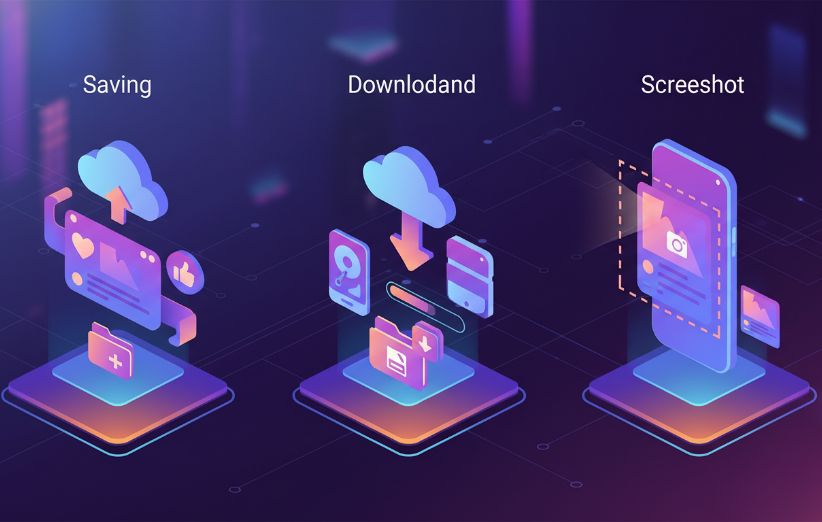
Although Facebook does not notify users in any of these cases, it’s still useful to understand the differences. Each action interacts with Facebook’s content differently, and some offer higher privacy risks. Here is a quick comparison:
| Action | What It Means | Does Facebook Notify? |
|---|---|---|
| Saving | User stores the photo on their device or gallery. | No |
| Downloading | User downloads the high-resolution file from Facebook’s servers. | No |
| Screenshot | User captures whatever is displayed on their screen. | No |
The important thing is this: none of these actions trigger any kind of notification. Users looking for visibility metrics often focus on engagement tools such as Buy Facebook Live Stream Reactions, but saving a photo is not counted, tracked, or measured by Facebook.
How to Protect Your Photos on Facebook
Even though Facebook doesn’t notify users when someone saves a photo, you can still significantly increase your privacy by adjusting your settings. Facebook gives you strong control over who can see, share, and interact with your posts. Below are effective ways to protect your images from being saved by strangers. These settings are especially important for businesses, creators, and public pages, where visibility is high — which is why many brands also pair their privacy strategy with growth tools like Buy Facebook Page Likes.
Recommended Privacy Settings
- Change photo visibility to Friends Only or Specific Friends.
- Disable Profile Picture Guard if you want added protection layers.
- Limit past posts so old photos become private.
- Turn off Public Search so strangers cannot find your profile photos easily.
- Review tag settings so others cannot expose your private images.
Steps to Change Photo Audience
- Open Facebook App → Go to your profile.
- Select the photo or album you want to edit.
- Tap the three dots and choose Edit Audience.
- Switch from Public to Friends, Only Me, or a Custom list.
- Save changes — they apply instantly.
For more technical details, Facebook provides guidance in the official Meta Privacy Center, confirming that the platform doesn’t detect saving or downloading images.
Common Misconceptions About Facebook Photo Notifications
Many myths circulate online about whether Facebook alerts people when photos are saved or screenshots are taken. However, almost all of them are incorrect. Facebook does not show “download notifications,” it does not mark posts with hidden alerts, and no third-party extension can reveal who downloaded your photos — any tool claiming to do this is fraudulent. Another misconception is that Messenger behaves differently, but Messenger also does not notify when photos are saved from chat threads. Even in group chats, saving an image does not trigger an alert for anyone. Understanding these myths helps users stay calm and avoid unnecessary panic about harmless platform behaviors.
Is It Safe to Share Photos on Facebook? Security Tips & Best Practices
Sharing photos on Facebook can be safe if you understand how the privacy system works and apply the right protections. Since the platform cannot stop users from saving or screenshotting your images, the best strategy is minimizing exposure through strict visibility settings. Use albums wisely, avoid posting high-resolution private content publicly, and regularly review your tag permissions. If you're a creator or business aiming to increase reach while staying secure, pairing good privacy settings with promotional tools like Buy Facebook Live Stream Views allows you to stay safe while still growing effectively.
FAQs
Does Facebook notify users if you download their photos?
No, Facebook does not send any kind of notification when a user downloads or saves someone else's photo. The platform does not track or report this behavior to the uploader.
Can Facebook detect screenshots of photos or posts?
No, Facebook cannot detect screenshots of posts, photos, or profiles. Screenshot behavior is entirely invisible to the platform, similar to regular photo saving or downloading.
How can I stop people from saving my photos on Facebook?
You cannot prevent technologically someone from saving your image, but you can limit exposure by restricting your photo audience, using privacy settings, disabling public visibility, and avoiding posting sensitive images.
Does Facebook send alerts for saving photos in Messenger?
No, Messenger does not notify when photos in chats are saved, downloaded, or screenshotted. The sender has no way of knowing this activity occurred.
Is there an app or extension that shows who saved my Facebook photos?
No legitimate tool can detect who saved or downloaded your Facebook photos. Any extension or app claiming to do this is unreliable, unsafe, or fraudulent — and should be avoided.