
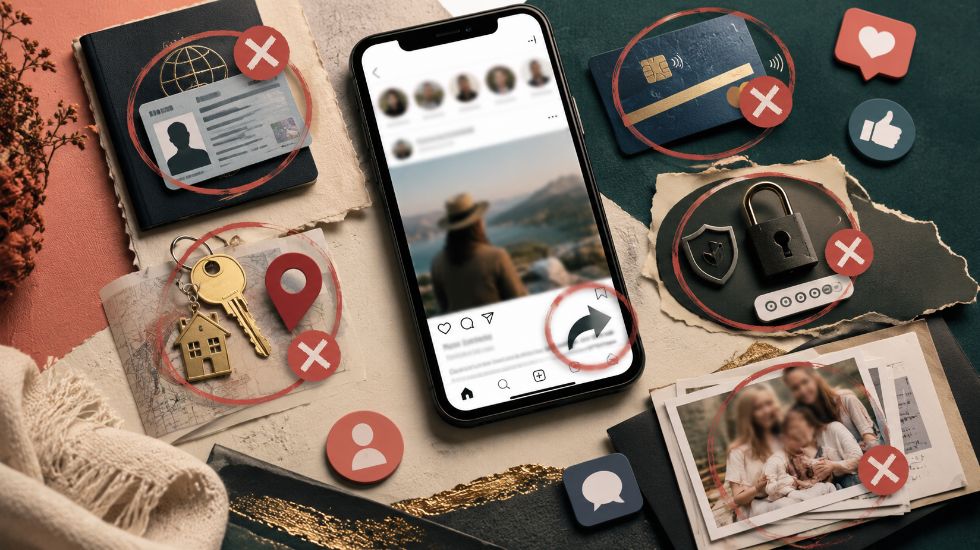
The question What are 5 things you should not share on social media? matters because most privacy mistakes do not look dangerous at the moment of posting. A birthday photo, travel update, document screenshot, school picture, or payment receipt may feel normal, but each one can reveal details that help strangers identify, locate, impersonate, or target you.
Social media is designed to make sharing easy, but privacy still needs a pause before posting. A safer account is not an empty account; it is an account that shares stories, ideas, and useful moments without exposing identity details, account access, money, family routines, or exact locations. For users and brands building a safer online presence, Mifasocial can be part of the broader conversation around smarter social media activity.
This guide gives a clear answer, then explains why each category is risky, what harmless-looking details can still expose you, how scammers use small clues, and how to share online without making your private life too easy to trace. 🔒
What are 5 things you should not share on social media?
Direct answer: The 5 things you should not share on social media are personal identification details, your home address or real-time location, financial information, passwords, login codes, or security answers, and private documents or family details. These details can help scammers, identity thieves, stalkers, or hackers identify you, locate you, access your accounts, steal your money, or target your family.
What are 5 things you should not share on social media? In simple words, do not post anything that could help someone prove who you are, find where you live, know when you are away, access your money, reset your passwords, or expose private details about your children, family, work, or documents.
The risk is not always one single post. The bigger risk is the collection of small details over time. A birthday here, a school name there, a vacation date later, and a pet name in another post can become a profile that helps someone guess, impersonate, or target you.
| Do Not Share | Why It Is Risky | Safer Choice |
|---|---|---|
| Personal identification details | Can support identity theft or account recovery attacks. | Keep IDs, full birth date, and official details private. |
| Home address or real-time location | Can expose your home, routine, or current absence. | Post later, crop signs, and avoid live check-ins. |
| Financial information | Can lead to fraud, scams, or unauthorized access. | Never post cards, statements, tax forms, or seed phrases. |
| Passwords and login codes | Can lead directly to account takeover. | Keep all codes, reset links, and security answers offline. |
| Private documents or family details | Can reveal names, schools, routines, records, or sensitive data. | Blur, crop, delay, or do not post. |
Why Oversharing Feels Normal but Creates Real Risk
Oversharing is risky because social media turns private moments into searchable, saveable, and shareable records. Even when a post is deleted later, it may already have been copied, screenshotted, downloaded, indexed, or shared outside your original audience.
The danger is usually not that one casual post reveals everything. The danger is that many casual posts can be combined. A person’s birthday, city, school, workplace, pet name, vacation plan, and family names can become enough context for scams, phishing, impersonation, or security-question guessing.
This is why a healthy social media strategy needs both activity and judgment. If you want a posting routine that helps you stay consistent without oversharing, What is the 5 5 5 rule on social media? explains a simple way to balance posting, engagement, and relationship-building.
| Small Detail | Possible Hidden Risk |
|---|---|
| Birthday with year | Can help identity matching or account recovery attempts. |
| Vacation dates | May show when your home is empty. |
| Pet name | May match a security answer or password clue. |
| Work badge | Can reveal employer, role, access details, or location. |
| Child’s school name | Can reveal a child’s routine and location. |
| Email screenshot | May expose contacts, subjects, account names, or private details. |
Do Not Share Personal Identification Details
Personal identification details are the first category to keep private. This includes national ID numbers, Social Security numbers, passport details, driver’s license information, full date of birth, full legal name combined with official records, and photos of identity documents.
These details can be used to impersonate you, open accounts, guess verification answers, or support fraud attempts. Even a partially visible document can reveal a name, number ending, birth date, address, barcode, QR code, or issuing authority.
The U.S. Cybersecurity and Infrastructure Security Agency’s social media guidance warns users to keep Social Security numbers, account numbers, passwords, full name, address, birthday, and vacation plans private. You can review CISA’s broader cybersecurity resources at Cybersecurity Best Practices.
| Do Not Share | Example |
|---|---|
| National ID or Social Security number | Typed number or photo of an ID card. |
| Passport details | Travel document photo or page screenshot. |
| Driver’s license | License number, barcode, or full image. |
| Full date of birth | Day, month, and year together. |
| Phone number with identity clues | Can support spam, SIM-related scams, or recovery attempts. |
| Full personal address | Connects identity to a physical place. |
Do Not Share Your Home Address or Real-Time Location
Your location is not only a map point. It can reveal your home, your routine, your workplace, your children’s school, where you are right now, or where you are not. That is why real-time location posts deserve extra caution.
Avoid posting your house number, apartment entrance, exact neighborhood, live check-ins, daily route, car license plate, workplace badge, or school uniform details. Also be careful with background clues such as street signs, building names, delivery labels, or window views.
Location privacy becomes even more important when you post travel plans. A public “leaving for two weeks” post may be exciting for friends, but it can also signal that your home is empty.
| Post Type | Risk | Safer Alternative |
|---|---|---|
| Live vacation update | Shows you are away from home. | Post after returning. |
| Home entrance photo | May reveal address or building details. | Crop house numbers and signs. |
| Live location tag | Shows where you are now. | Use general city tags or delay the post. |
| Child’s school photo | Reveals school and routine. | Remove logos, uniforms, and location clues. |
| Office badge selfie | May reveal employer or access details. | Cover badge text and barcode. |
Do Not Share Financial Information
Financial information should stay private even when the post is meant as a celebration. Do not post bank cards, bank statements, tax forms, invoices with sensitive details, crypto seed phrases, payment screenshots, salary slips, or receipts that show personal data.
A screenshot may reveal more than you notice at first. Names, account endings, QR codes, transaction IDs, addresses, payment references, and invoice numbers can all be useful to scammers.
The FTC explains identity theft as someone using your personal or financial information without permission, including names, addresses, credit card or bank account numbers, Social Security numbers, and medical insurance information. You can read more in the FTC guide What To Know About Identity Theft.
| Do Not Share | Why |
|---|---|
| Credit or debit card | Can expose card details and fraud risk. |
| Bank statement | Can reveal account and identity information. |
| Payment receipt | May show name, address, transaction ID, or QR code. |
| Crypto seed phrase | Can lead to full wallet loss. |
| Tax document | Can expose identity and financial details. |
| Invoice with address | Can reveal personal or business location data. |
Do Not Share Passwords, Login Codes, or Security Answers
Never share passwords, one-time login codes, two-factor authentication codes, recovery codes, password reset links, verification links, or screenshots from login pages. These details can give someone direct access to your accounts.
Also be careful with posts that reveal security-answer clues. Pet names, first school, childhood street, favorite teacher, first car, or mother’s maiden name may seem harmless, but those details are often used in account recovery questions.
| Do Not Share | Risk |
|---|---|
| Password | Direct account takeover. |
| Login code | Bypasses normal login protection. |
| Recovery code | Can let someone regain access. |
| Password reset link | Can let someone change your password. |
| Security question answers | Helps account recovery attacks. |
| API keys or tokens | Can expose accounts, apps, or software systems. |
Do Not Share Private Documents, Children’s Details, or Family Information
Private documents and family details deserve special care. Do not post school forms, medical papers, legal letters, contracts, boarding passes, certificates, work badges, official notices, or documents that show names, addresses, dates, codes, numbers, or private routines.
Children’s information needs extra caution because children cannot fully control their digital footprint. Before posting a child’s photo, school, uniform, location, birthday, routine, certificate, or ID-related detail, think about whether that information could identify or locate them.
The FTC also provides specific guidance on protecting children’s personal information, including protecting documents and being careful with Social Security numbers. Their guide How To Protect Your Child From Identity Theft is a useful resource for parents and guardians.
| Information Type | Safer Choice |
|---|---|
| School name or uniform | Crop, blur, or avoid posting. |
| Child’s full name and birthday | Keep private or use limited audience settings carefully. |
| Medical document | Do not post. |
| Legal document | Do not post. |
| Boarding pass | Do not post; it may include scannable codes. |
| Work badge | Cover names, numbers, barcodes, and access details. |
What Looks Harmless but Can Still Be Risky?
Some risky posts do not look risky at first. A birthday caption, a pet photo, a “first car” memory, or a school celebration may reveal clues that help someone build a profile about you.
Before posting, ask yourself a simple question: could this help someone identify me, locate me, impersonate me, guess a security answer, or access one of my accounts? If the answer is maybe, rewrite, crop, blur, delay, or skip the post.
| Harmless-Looking Post | Hidden Risk |
|---|---|
| “Happy birthday to me, 1995 baby!” | Reveals birth year. |
| “My first car was a Honda Civic.” | May match a security-answer clue. |
| “At the airport for two weeks away.” | Reveals travel absence. |
| “My kid starts at Lincoln School today.” | Reveals a child’s location. |
| “New job badge!” | May reveal workplace access details. |
| Screenshot of email inbox | May reveal private contacts or account names. |
How Scammers Use Small Details From Social Media
Scammers rarely need everything at once. They often collect fragments: your workplace, city, recent trip, pet name, friend names, family details, or interests. Then they use those fragments to make phishing messages, impersonation attempts, or fake support messages feel more believable.
For example, a scam message that mentions your recent trip, your child’s school, your company name, or your pet may feel more personal. That is why privacy is not only about hiding official numbers. It is also about limiting clues that make scams easier to customize.
This is where faster posting habits can create mistakes. If you create videos, stories, or captions quickly, review What is the 3 second rule in social media? with privacy in mind: a strong hook should not expose sensitive details just to get attention.
What Can You Share Instead?
You do not need to stop using social media to stay safer. The goal is to share with a privacy filter. You can post travel photos after returning, crop address details, blur badges, avoid exact school names, and celebrate milestones without showing documents or private numbers.
For creators and businesses, safer sharing also protects trust. Your audience does not need to see private documents, full customer details, internal dashboards, or confidential client information to believe your story.
| Instead of Sharing This | Share This Instead |
|---|---|
| Real-time vacation location | Post after returning. |
| Full birthday | Celebrate without showing full date and year. |
| Home exterior with number | Crop or blur address details. |
| Child’s school photo | Crop logos, uniforms, and location clues. |
| Payment screenshot | Share a general milestone without transaction details. |
| Work badge selfie | Cover badge details or choose a different photo. |
Safe Social Media Posting Checklist
Before posting, use a short privacy check. It only takes a few seconds, but it can prevent exposing personal details that are difficult to take back later.
- Does this post show my home address or exact location?
- Does it reveal that my home is empty?
- Does it show an ID, card, bill, ticket, badge, or document?
- Does it include my child’s school, routine, or full name?
- Does it reveal my phone number, email, or account details?
- Does it show a password, login code, QR code, or recovery detail?
- Does it reveal a security-answer clue such as pet name, school, or birth date?
- Would I be comfortable if a stranger saved this screenshot?
- Can I crop, blur, delay, or rewrite the post to make it safer?
Common Mistakes People Make With Social Media Privacy
A common mistake is trusting the moment too much. People post live travel updates, school celebrations, new job badges, payment screenshots, and family details because the post feels exciting right now. The risk appears later, when the information is saved or combined with other details.
Another mistake is assuming that “friends only” means fully private. Privacy settings help, but friends can screenshot, accounts can be compromised, and platforms can change settings. Sensitive information should stay offline even when the audience looks limited.
Safer posting also fits into broader social media quality. What are the 7 C's of social media marketing? is useful here because credibility and consistency matter more when your content protects both the brand and the audience.
| Mistake | Why It Is Risky | Better Approach |
|---|---|---|
| Posting live vacation updates | Shows home may be empty. | Post later. |
| Sharing full birthday | Helps identity matching. | Avoid year or full date publicly. |
| Posting document photos | Exposes official data. | Keep documents private. |
| Showing child’s school | Creates safety risk. | Crop, blur, or avoid. |
| Answering viral personal quizzes | May reveal security clues. | Avoid sensitive answers. |
| Sharing too much in the bio | Makes profiling easier. | Keep public bios focused and minimal. |
What Should You Realistically Expect?
You should realistically expect that anything posted online can travel beyond the audience you had in mind. Privacy settings reduce exposure, but they do not make sensitive information completely safe.
The safest habit is to avoid posting details that identify you too precisely, locate you in real time, expose your money, reveal account access, or put family privacy at risk. You can still share your life, business, work, and ideas online, but sensitive details should stay offline.
What are 5 things you should not share on social media? Anything that helps someone identify you, locate you, access your accounts, steal your money, or expose private family details should be treated as private. Share the story, not the sensitive data. 💡
Final Thoughts on What Not to Share Online
Social media privacy is not about fear. It is about control. The more personal information you post, the easier it becomes for others to build a detailed picture of your identity, routine, money, accounts, or family life.
Keep the five main categories private: identification details, home address or live location, financial information, passwords and login codes, and private documents or family details. When in doubt, crop, blur, delay, rewrite, or do not post.
FAQ About What Not to Share on Social Media
These FAQs answer common questions about social media privacy, including location sharing, birthdays, children’s photos, sensitive information, and what to do after posting something risky.
What are 5 things you should not share on social media?
The 5 things you should not share on social media are personal identification details, home address or real-time location, financial information, passwords or login codes, and private documents or family details. These details can expose you to scams, identity theft, account takeover, stalking, or unwanted attention.
Why should you not share your location on social media?
You should avoid sharing your real-time location because it can show where you are, where you are not, and what your routine looks like. Posting vacation plans or live check-ins can also reveal that your home may be empty. It is safer to post location-based content after you leave or return home.
Is it safe to share your birthday on social media?
Sharing a birthday without the year is lower risk than sharing your full date of birth, but it can still become part of a larger identity profile. Full birth dates are often used in identity checks, forms, and account recovery. If privacy matters, avoid posting your full birthday publicly.
Should you post pictures of children on social media?
If you post children’s photos, avoid sharing their full name, school, location, uniform, daily routine, or private documents. Children cannot fully control their digital footprint, so adults should be careful with identifying details. Crop, blur, delay, or avoid details that could locate or identify them.
What should I do if I already shared sensitive information?
If you already shared sensitive information, delete or hide the post, change exposed passwords, enable two-factor authentication, contact your bank if financial details were shown, and monitor your accounts for suspicious activity. If identity details were exposed, official identity-theft resources can help you plan recovery steps.
Are private social media accounts completely safe?
Private accounts are safer than fully public accounts, but they are not completely risk-free. Followers can screenshot posts, accounts can be compromised, and information can still spread outside your intended audience. Sensitive details such as passwords, IDs, financial documents, and children’s location details should stay offline even on private profiles.